
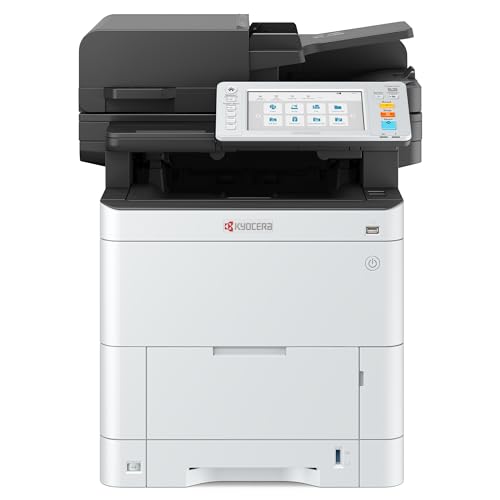
Kyocera ECOSYS MA3500cifx vs Lexmark CS735de
Kyocera ECOSYS MA3500cifx costs $21 more upfront but prints cheaper per page — it pays that back after about 15,022 pages.

Cost to run
| Total cost of ownership | Kyocera ECOSYS MA3500cifx | Lexmark CS735de |
|---|---|---|
| After 1 year | $1,543 | $1,530 |
| After 2 years | $1,616 | $1,611 |
| After 3 years | $1,689 | $1,693 |
Kyocera ECOSYS MA3500cifx costs more upfront but 0.1¢ less per page. It overtakes Lexmark CS735de on total cost after about 15,022 pages — roughly 31 months at your 500 pages/month.
Specs compared
| Spec | Kyocera ECOSYS MA3500cifx | Lexmark CS735de |
|---|---|---|
| Print technology | laser | laser |
| Color support | color | color |
| Device type | multifunction | single-function |
| Functions | print, scan, copy, fax | |
| Print speed (mono) | 37 ppm | 52 ppm |
| Print speed (color) | 37 ppm | 52 ppm |
| Resolution | 1200 dpi x 1200 dpi, 9600 dpi x 600 dpi, 600 dpi x 600 dpi | Black: 1200 x 1200 dpi, 4800 CQ (2400 x 600 dpi) Color: 4800 CQ (2400 x 600 dpi), 1200 x 1200 dpi |
| Duty cycle (monthly) | — | 150,000 pages |
| Recommended volume | — | 20,000 pages/mo |
| Automatic duplex | Yes | Yes |
| Automatic document feeder | Yes | No |
| Display | — | Lexmark e-Task 4.3-inch color touch screen |
| Wi-Fi | Yes | No |
| Ethernet | No | No |
| USB | No | No |
| Bluetooth | No | No |
| Paper sizes | A4, Legal, Letter | Letter, Legal, A4 |
| Weight (kg) | — | 32 |
Cartridges & running cost
Kyocera ECOSYS MA3500cifx
Cheapest to run: Kyocera Black Toner — $84.99 · 1.2¢/page · 7,000pg yield
Lexmark CS735de
Cheapest to run: Lexmark CS730, 735, CX730 Black Return Program 22K Toner Cartridge — $298.00 · 1.4¢/page · 22,000pg yield
Which should you buy?
- High-volume or cost-conscious printing: Kyocera ECOSYS MA3500cifx — about 10% lower cost per page (1.2¢ vs 1.4¢).
- A lower upfront budget: Lexmark CS735de — $21 less to buy — it would take about 15,022 pages before the pricier one's lower running cost pays off.
- If you need scanning, copying and faxing: Kyocera ECOSYS MA3500cifx — it adds scanning, copying and faxing, which the Lexmark CS735de doesn't do.
- The fastest printing for a busy or shared office: Lexmark CS735de — 52 ppm vs 37 ppm mono.
Where to buy
Kyocera ECOSYS MA3500cifxBuy — $1469.99
Lexmark CS735deBuy — $1448.90
Compare with other models
Frequently asked questions
- Which is cheaper to run, the Kyocera ECOSYS MA3500cifx or the Lexmark CS735de?
- The Kyocera ECOSYS MA3500cifx — its cheapest black cartridge works out about 10% cheaper per page (1.2¢ vs 1.4¢ mono).
- Which costs less to buy, the Kyocera ECOSYS MA3500cifx or the Lexmark CS735de?
- The Lexmark CS735de is about $21 cheaper upfront based on current prices.
- Is the Kyocera ECOSYS MA3500cifx worth the higher price?
- It costs about $21 more upfront but prints cheaper per page, so it pays that back after roughly 15,022 pages. Past that point it's the cheaper machine to own.
- What are the main differences between the Kyocera ECOSYS MA3500cifx and the Lexmark CS735de?
- Device type: Kyocera ECOSYS MA3500cifx multifunction, Lexmark CS735de single-function. Functions: Kyocera ECOSYS MA3500cifx print, scan, copy, fax, Lexmark CS735de print. Print speed (mono): Kyocera ECOSYS MA3500cifx 37 ppm, Lexmark CS735de 52 ppm. Print speed (color): Kyocera ECOSYS MA3500cifx 37 ppm, Lexmark CS735de 52 ppm.